Jezzam lets you manage different types of bookings, from one-to-one appointments to classes, workshops and multi-session courses.
Jezzam supports two main types of booking:
- Services are used for appointment-style bookings.
- Events are used for activities that have a number of places available.
Events can then be created as a single Event, as a series of Repeating Events or as a Course.
The important difference is how your customers book them.
Services and appointments
A Service is used when a customer books an available appointment time.
For example, you might use Services for:
- Consultations
- Treatments
- Private lessons
- One-to-one appointments
A Service booking is essentially one-to-one: once an appointment time has been booked, that time is no longer available for another customer to book.
Events
An Event is a bookable activity that can have a number of places available.
Although Jezzam calls these Events, your customers might think of what you offer as a class, workshop, group session, talk, show, concert, gig, activity or something similar.
You can create a single Event on one particular date, or you can create a series of Events.
Repeating Events and Courses
When you need to create a series of Events, Jezzam gives you two different booking methods:
- Each session can be booked separately (Repeating Event)
- All sessions in the series are booked together (Course)
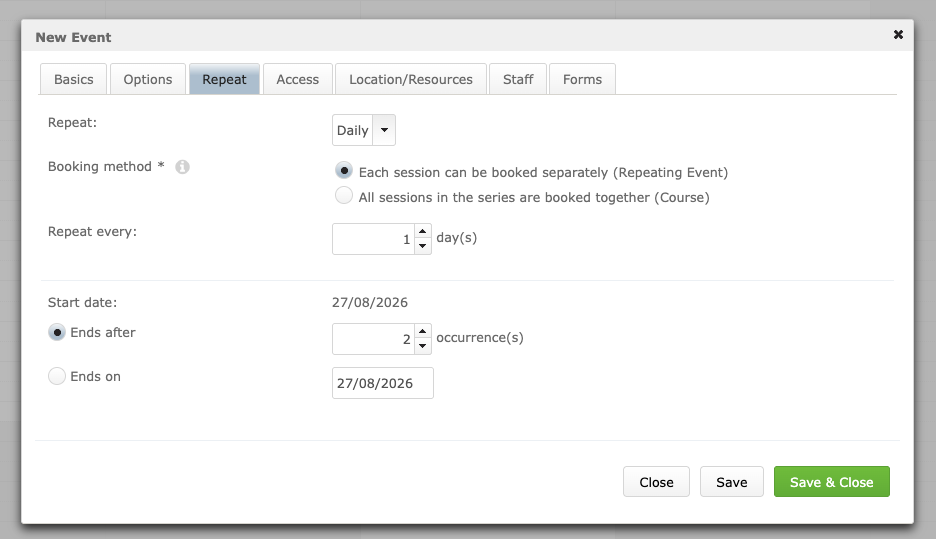
This choice determines how the series works for your customers.
Repeating Events
Repeating Events are useful when you run the same or a similar Event regularly, but customers should be able to choose which individual dates they want to attend.
Jezzam creates the Events together as a series, but once they have been created, each one is an individual Event.
For example, suppose you run a class every Tuesday for six weeks. If you create it as Repeating Events, a customer could book:
- Just one Tuesday
- Weeks 2 and 4
- All six Events
- Any other combination of the individual Events
Where online payment is required, each Event has its own price. So if a customer books several Repeating Events, the total price is made up of the prices of the individual Events they have chosen.
Customers can also book more than one place at the same time. This might be several places on one Event or, if Jezzam's Basket feature is enabled, places on different Events. Jezzam groups those bookings into a single Order and any payment due is made in one go.
Each Event can also be managed individually after the series has been created. For example, you can change details such as its date or time, Location, Staff, name or price without changing the other Events in the series.
TIP: Repeating Events are generally the right choice for regular classes where customers can choose which individual classes or dates they want to attend.
Courses
A Course is also made up of a series of Events, but the way they are booked is different.
When Events belong to a Course, Jezzam refers to the individual Events as Course Sessions.
Customers do not book these Sessions separately. Instead, they book the complete Course, which books them onto all of its Sessions at the same time.
Where online payment is required from your customers, the price is for the whole Course rather than individual Sessions or only some of the Sessions.
For example, if you create a six-week language Course costing £120, a customer books all six Sessions and the £120 price applies to the complete Course.
Customers cannot use online booking to select only weeks 1, 3 and 5, or join part-way through and book only the remaining Sessions.
TIP: A Course is generally the right choice when customers are enrolling for a complete programme or series rather than choosing individual dates.
Managing Course Sessions
From an administrator's point of view, an individual Course Session works in much the same way as an Event and appears in the Admin Calendar.
You can edit Session-specific details such as its date and time, duration, Location or Staff.
Some information, however, belongs to the Course as a whole. For example, the name and price cannot be changed for just one Session because these are properties of the Course rather than the individual Session.
To change Course-level information, select 'Edit the whole course' from the Admin Calendar. Changes to this information then apply across the Course.
When does online booking for a Course close?
Because customers book a Course as a complete series, a Course is only available for online booking before its first Session starts.
Your account's booking window rules may cause online booking to close earlier, but online booking for a Course will close no later than the start of its first Session.
This is different from Repeating Events. Each Event in the series is booked separately, so future Events can remain available for online booking after earlier Events have taken place. Online booking for each individual Event will close no later than the start of that Event and may close earlier depending on your booking window rules.
If you want to allow somebody to join a Course after it has started, you can still add them directly to the Course by booking them on via the Admin Calendar.
Repeating Events or a Course?
A simple way to decide which to use is to ask:
Should my customers choose which individual dates they attend?
If yes, use Repeating Events.
Should my customers enrol for the complete series?
If yes, use a Course.
Here are some examples:
- A weekly drop-in yoga class where customers choose which weeks to attend – use Repeating Events.
- A six-week beginners' yoga programme where customers enrol for all six weeks – use a Course.
- A weekly conversation class where customers can attend individual classes – use Repeating Events.
- A six-week language course with one price covering the complete programme – use a Course.
NOTE: The words your organisation uses do not have to match Jezzam's terminology. You may describe what you offer to your customers as a class, lesson, workshop or programme. What matters when setting it up in Jezzam is whether it is an appointment, an individually bookable Event or a series that is booked together as a Course.
Quick summary
| Booking type | How customers book | How a series works |
|---|---|---|
| Service | Books an available appointment time | Not applicable |
| Single Event | Books one or more places on that Event | Not applicable |
| Repeating Events | Books each Event separately | Customers choose which individual Events they want to attend |
| Course | Books the complete Course | All Sessions are booked together |
Was this article helpful?
That’s Great!
Thank you for your feedback
Sorry! We couldn't be helpful
Thank you for your feedback
Feedback sent
We appreciate your effort and will try to fix the article